Bluesky is a relatively new and decentralized social media platform designed to give users control over their data and online presence by separating social networks from the underlying protocols they use. It is built on the Authenticated Transfer Protocol (AT Protocol), a federated, open protocol that enables seamless data portability, content moderation, and interoperability between different platforms. This AT protocol emphasizes user control, algorithmic transparency, and scalability, aiming to create a more open and user-centric social internet while addressing the issues of centralized platforms like data ownership and censorship.
Bluesky has recently gained significant popularity, especially as users search for alternatives to centralized platforms like X (formerly Twitter). Dissatisfaction with changes on major social media platforms has driven interest in Bluesky’s decentralized approach and user-centric features. This shift has led to a rapid expansion of its user base, growing from 13 million in October 2024 to over 24 million by early December, with the platform frequently topping app store download charts.
Bluesky Chrome Extension
We’ve developed a lightweight Chrome extension tailored for Bluesky users, designed to offer functionality similar to our popular “Share on Twitter” extension. You can easily install it directly from this page to enhance your Bluesky experience.
This Bluesky Share Extension makes it effortless to share web pages, links, and selected text directly to Bluesky. Simply click the extension icon or use the context menu (right-click menu) option to share your content with ease.
How To Use
Install the extension from here, and follow this tutorial to pin its icon to your browser toolbar. Once set up, simply click the icon whenever you want to share the current tab on Bluesky.

Additionally, you can right-click anywhere on a webpage — whether it’s a link, an image, or selected text — and instantly share it on Bluesky using the context menu.

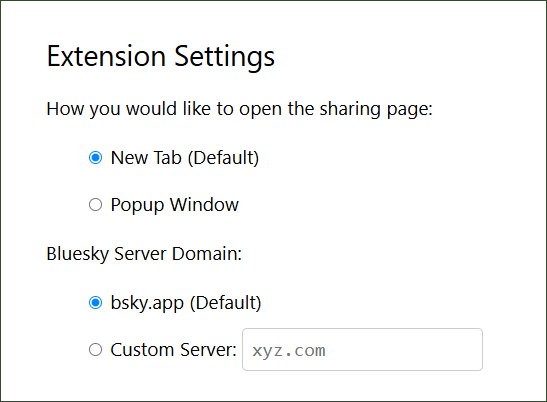
Extension Settings
By default, the extension opens the sharing URL in a new tab, but you can customize it to open in a popup window instead. It is pre-configured to use the official Bluesky instance (bsky.app), but if you use a self-hosted server (Personal Data Server PDS), you can easily update the settings to integrate it.
To adjust the extension settings, follow this tutorial. In summary, right-click the extension icon on your browser toolbar and select “Options” from the menu to access the configuration page.
Privacy
This extension requires no data access permissions from users, ensuring a straightforward and transparent functionality. It does not track or collect any user data, making it highly privacy-friendly. For more details, you can review our comprehensive privacy policy here.
Support
If you find this lightweight Chrome extension helpful, we’d greatly appreciate your support by rating and reviewing it on the Chrome Web Store. Your feedback and suggestions are always welcome — feel free to leave a comment below or reach out to us on Bluesky!
addon the last few days seems like it needs an update thanks in advance doesnt share anymore