The default new tab in Chrome is forgettable: a blank slate, default search box, a few shortcuts, and not much else. If you rely on bookmarks to organize your web life, that’s a missed opportunity. The Bookmarks New Tab Page extension offers a focused, elegant solution: turn every new tab into a powerful, personalized bookmarks dashboard. No clutter, no distractions, just direct access to the sites and folders that matter to you.
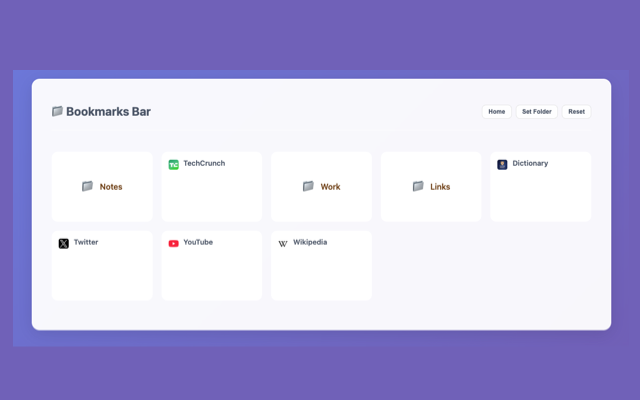
A Bookmarks-Centric New Tab Experience
Instead of showing you recent sites or Google search, this extension lets you select any bookmark folder to display as your new tab. Want quick access to your “Research,” “Work Tools,” or “Daily Reads” folders? Set it once — it loads instantly, every time.
It doesn’t just list bookmarks flatly. The extension supports hierarchical display, meaning it shows nested folders in a clean, organized structure. You can browse deeply nested categories without needing to open the Chrome bookmarks manager.
The interface includes:
- Real-time Search: Find bookmarks fast by typing just a few characters.
- Favicon Display: Identify sites at a glance.
- Responsive Design: Works fluidly across screen sizes — whether you’re on a large desktop screen or a small laptop.
- Auto Theme Detection: It syncs with your system theme (light or dark) but also allows manual override.
Setup
Install this tiny extension from this Chrome Web Store page. Now, when you open a new tab, Chrome will prompt you to set it as your default new tab page, accept that prompt to activate this extension.
Setup is instant: just choose a folder — like the Bookmarks Bar — and you’re done. You can switch folders at any time via a simple “Set Folder” button. No login, no onboarding wizard, no unnecessary permissions.
Privacy and Sync
Bookmarks are stored locally and are never uploaded or tracked. The extension works entirely within Chrome’s own bookmark system. That also means it integrates smoothly with Chrome Sync. Set it up once, and the same dashboard layout follows you across devices.
The Bookmarks New Tab Page extension is minimal by design but powerful in utility. It transforms Chrome’s empty default into a functional, bookmark-powered workspace — without overreach, bloat, privacy issues or complexity. If you already live by bookmarks, this gives them the front-and-center visibility they deserve.
If you like this extension, please consider rating it 5-stars on the Chrome Web Store. Feel free to leave a comment below for any feedback or suggestion.