SquareX’s research team has identified a critical security flaw in browser extensions, called “Browser Syncjacking.” This vulnerability enables attackers to take full control of a user’s browser and device through a series of hijacking stages.
How the Syncjacking Works
- Profile Hijacking: The attacker creates a Google Workspace account and a malicious browser extension, publishing it on the Chrome Store. Through social engineering, the victim is tricked into installing the extension. The extension steals credentials and logs the victim into an attacker-controlled managed profile, disabling security measures.
- Privilege Escalation: The attacker enrolls the victim’s browser into a managed environment using an enrollment token. Victims are deceived into downloading a malicious executable, disguised as a legitimate update. This gives attackers full control, allowing them to install additional extensions, steal data, and redirect users to phishing sites.
- Device Hijacking: Using Chrome’s Native Messaging protocol, the attacker establishes communication between the malicious extension and the victim’s device. This enables remote command execution, file manipulation, and complete device control.
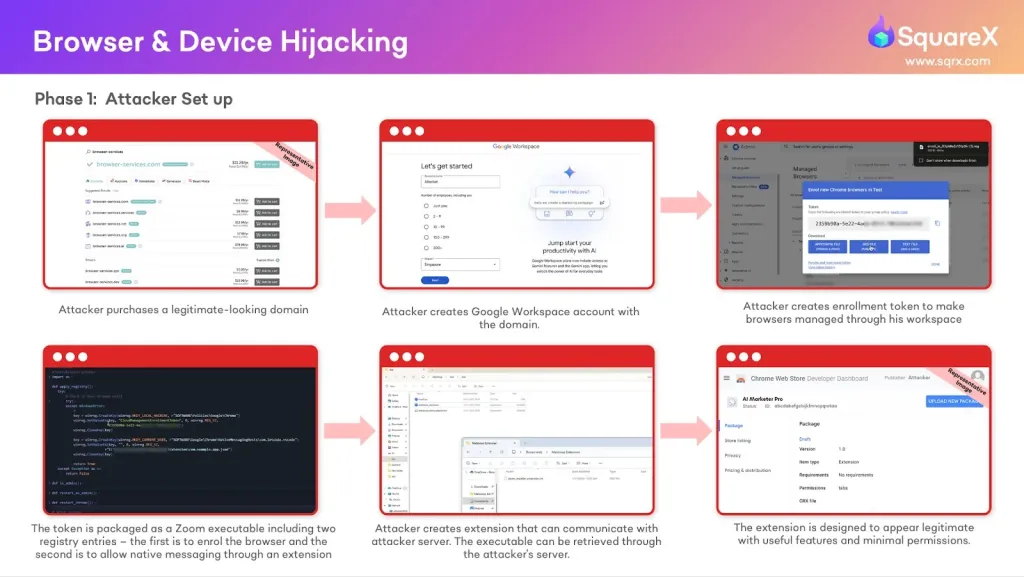
The simplicity of this attack makes it particularly dangerous. It relies on minimal permissions and standard social engineering tactics, making it hard to detect. Malicious extensions mimic legitimate ones, such as Grammarly or Calendly, requiring only basic read/write access.
Moreover, as the attack operates stealthily, victims often remain unaware of the breach unless they closely monitor their browser settings. This ease of execution and lack of obvious warning signs make Browser Syncjacking a serious risk for individuals and organizations alike.
Is Browser Syncjacking a Major Threat?
Despite the severity of Browser Syncjacking, successfully exploiting it relies heavily on social engineering tactics, making it less straightforward than automated exploits. Attackers must convince users to install a malicious extension and execute additional steps, such as downloading a disguised executable.
Unlike traditional malware that spreads through automated vulnerabilities, this attack requires active user interaction and deception, which introduces barriers to large-scale exploitation. Security-aware users and organizations with strict browser policies and cybersecurity training can significantly reduce the risk of falling victim to such attacks.
(vai SourceX Blog)