The Better ChatGPT Search is a Chrome extension for the users of OpenAI’s ChatGPT Search. You can install it from this Chrome Web Store page for Google Chrome, Microsoft Edge and other Chromium-based browsers.
What is ChatGPT Search?
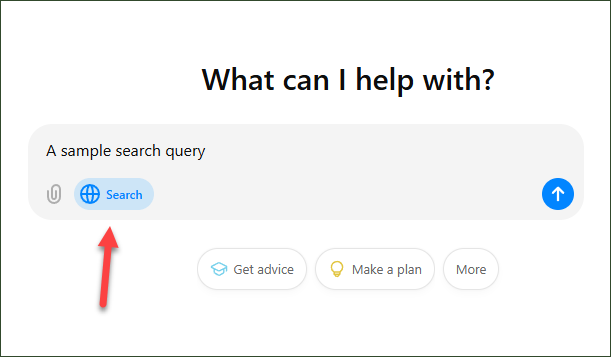
The ChatGPT Search, initially introduced as SearchGPT, is a new AI-powered search engine by OpenAI. It is a built-in feature of ChatGPT itself available only to the paid users as of now. This search feature doesn’t work always, ChatGPT uses it automatically depending upon the query of the users. Moreover, users can manually enable it by clicking the globe icon right in the chat box as shown below:
Problem with the official ChatGPT Chrome Extension
OpenAI has also launched an official Chrome extension for the ChatGPT Search, making it more convenient for the users to access ChatGPT-powered search functionality directly within their browser.
This extension, available for download here, integrates seamlessly with the Chrome browser, allowing users to initiate a ChatGPT search from the address bar, also known as the omnibox. By typing specific keywords or commands, users can invoke ChatGPT’s responses without needing to open a separate tab or navigate to the ChatGPT site.
However, there is an important consideration for those interested in using this extension. This extension overrides the default search engine of Chrome, and thus, redirecting all searches through ChatGPT rather than other search providers like Google. This change could be inconvenient for users accustomed to traditional search engines or those who want to keep them as their primary search tool. For some, this adjustment may feel limiting, as it impacts every search conducted in the browser’s address bar.
Better ChatGPT Search Extension
To solve this problem, we have created an alternative extension for ChatGPT Search: the Better ChatGPT Search. Unlike the official extension, Better ChatGPT Search does not alter your browser’s default search engine, offering a flexible way to leverage ChatGPT Search without disrupting existing search workflows. Here’s how it can be used:
- Search from the Address Bar: With Better ChatGPT Search, you can initiate ChatGPT searches directly from the Chrome address bar (omnibox) by typing “gpt” followed by a space. This keyword activates the extension, letting you enter your query, which Better ChatGPT Search sends to ChatGPT Search instead of your default search engine. See the following video for this step in action.
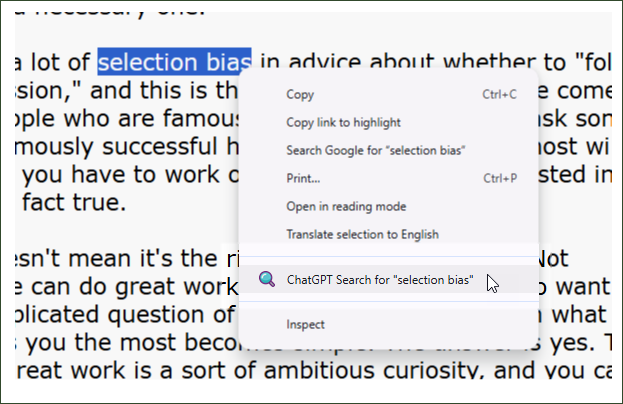
- Search using the context menu: For on-the-fly searches within webpages, simply highlight the text snippet you want to look up, right-click on it, and choose the “ChatGPT Search” option from the context menu. This sends your highlighted text directly to ChatGPT Search, saving you time and effort.
- Use the extension icon on the browser toolbar: Pin the extension’s icon on your toolbar by following this tutorial. You can click this icon to launch ChatGPT website in a new tab with search feature enabled by default. It works like a bookmark.
Use Temporary Chat Feature
ChatGPT offers a temporary chat feature which is like the incognito browsing mode of web browsers. When this mode is enabled, ChatGPT disregards all prior conversations and any stored memory, generating responses solely based on the immediate context of your query. Conversations held in temporary chat mode won’t appear in your chat history, ensuring that these interactions remain private and do not linger in your account records. Additionally, these exchanges are not utilized for training OpenAI’s LLMs, offering an added layer of data privacy and control.
This feature is particularly valuable for users who want responses without saving them in the chat history—whether for handling sensitive information, exploring unique queries, or testing ideas that don’t need to be saved for future reference. With temporary chat enabled, users can interact freely, knowing that neither past prompts nor the current conversation will influence ChatGPT’s responses.
The Better ChatGPT Search extension integrates this feature seamlessly by allowing users to activate temporary chat mode for every search query made through it. With this option, each search initiated through Better ChatGPT Search will automatically run in temporary mode, aligning with users’ preferences for enhanced privacy and single-use interactions. This makes Better ChatGPT Search a practical choice for those who want a streamlined, private search experience without the need to manually enable the temporary chat mode each time.
To enable temporary chat feature, right click on the extension’s icon on the toolbar (follow this tutorial if the icon is not visible on the toolbar), and select “Options” as shown in the following screenshot:
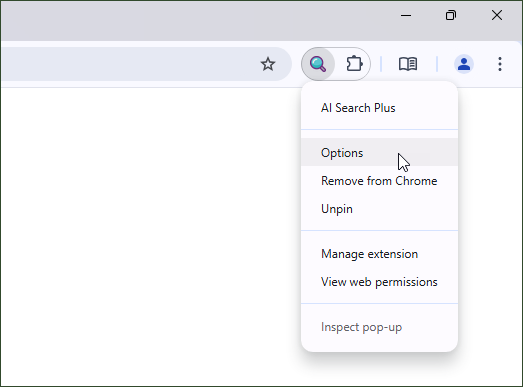
This open the options page of extension, where you can enable the temporary chats on your all search queries.
Support
If you find this extension useful, please rate and review it on the Chrome Web Store. For any feeback or suggestion, leave a comment below.