We invite you to try WebSage, our new AI-powered browser extension. It offers integration with Chrome’s built-in Gemini Nano model. Learn more here.
Chrome has added experimental support for Google’s Gemini Nano AI model. This brings native AI capabilities in the Chrome browser, which works even without network connection.
As of now, you need Chrome Canary or Dev versions to test this feature. Your computer should have an Integrated or discrete GPU, at least 4GB RAM, enough disk space on the drive that contains your Chrome installation and user profile. It is currently supported on Windows and macOS platforms only.
Here are the steps to enable it:
Make sure you are using latest Chrome Dev or Canary version, which is v128 right now.
Set these two Chrome flags and restart the browser:
chrome://flags/#optimization-guide-on-device-model(set to Enabled BypassPerfRequirement)chrome://flags/#prompt-api-for-gemini-nano(set to Enabled)
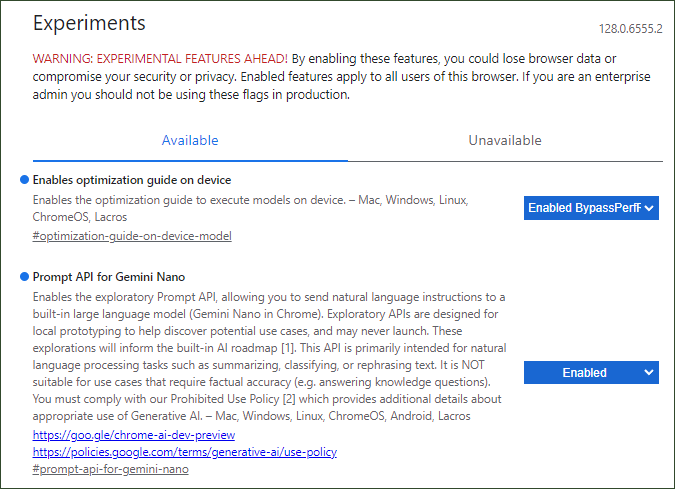
- After restarting the browser, visit
chrome://componentspage, and look for On Device Model or Optimization Guide On Device Model
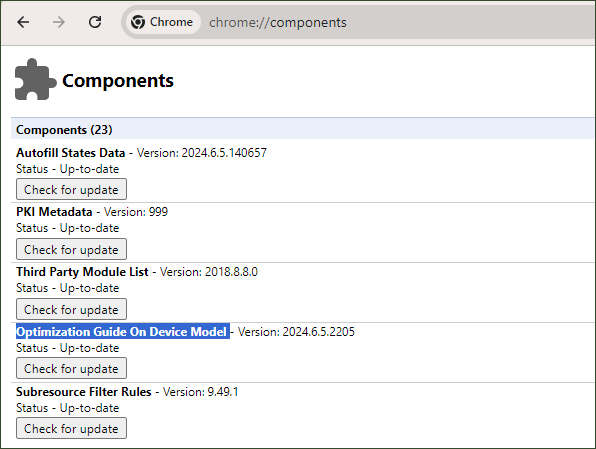
- Make sure to update the above option by clicking on the “Check for Update” button. It would take some time as it downloads the model on your computer. Once update finishes, restart the browser.
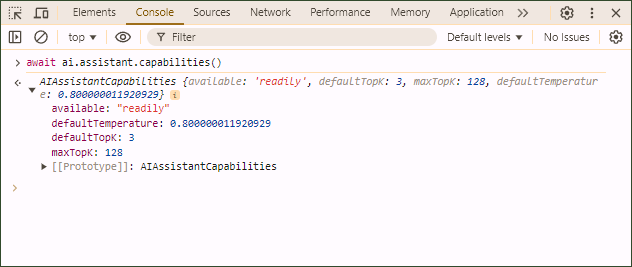
Above steps should enable the on device Gemini Nano AI model in Chrome browser. To test if it works, open the DevTools in any tab and enter the following code in the console:
await ai.assistant.capabilities();
If this doesn’t returns any error and the output is similar to the following screenshot, you are all set. You can also test this by visiting this page.
Now, you are ready to experiment with the Chrome’s built-in artificial intelligence model, Gemini Nano. Here is an important note from Chrome’s flag page:
(This feature) Enables the exploratory Prompt API, allowing you to send natural language instructions to a built-in large language model (Gemini Nano in Chrome). Exploratory APIs are designed for local prototyping to help discover potential use cases, and may never launch. […] This API is primarily intended for natural language processing tasks such as summarizing, classifying, or rephrasing text. It is NOT suitable for use cases that require factual accuracy (e.g. answering knowledge questions).
I highly recommend you to watch the following video from Google I/O 2024 for more information on this topic:
Recommended Extension: Try our Query To ChatGPT Chrome extension, which enables you to easily pass text snippets to ChatGPT with option to prepend any prompt text