Google Chrome’s built-in PDF viewer is set to receive annotation feature. An “Annotate” button has been added to the toolbar of the PDF viewer in the latest Canary builds of Chrome.
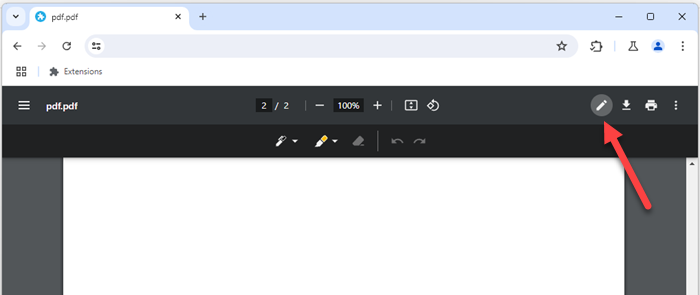
This button launches a separate annotation toolbar containing various buttons for annotating the PDF file. This feature is currently behind the Chrome flag “PDF Ink Signatures”, and requires manual enabling. Once enabled, users can find the above annotate button on the main toolbar. As this feature is currently not fully implemented, the annotation feature doesn’t work as of now.
Once fully operational, this new feature will allow users to highlight text, add comments, and even draw on the PDFs directly within the Chrome browser. This will work with both online and offline PDF files. This is expected to significantly enhance the functionality of Chrome’s PDF viewer, making it a more versatile tool for users.
It’s worth noting that Microsoft Edge’s built-in PDF reader already has a fully functional PDF annotation feature.
PDF annotation is a highly sought-after feature in Chrome. Currently, users have to resort to third-party tools and extensions for this purpose. With the integration of this feature directly into Chrome’s PDF reader, Google aims to provide a seamless and efficient user experience.
(H/T @Leopeva64)