For those who love to customize their desktops, setting an image as your wallpaper is a simple yet effective way to personalize your experience. Here’s a simple and efficient Chrome extension, Set Images As Chrome OS Wallpaper, for the users of Chromebooks and other Chrome OS devices. This extension makes setting any online image as your Chromebook wallpaper a breeze.
What Does This Extension Do?
The Set Images As Chrome OS Wallpaper extension is designed specifically for the Chromebook and Chrome OS users. It doesn’t work on Windows, Linux or macOS.
It allows you to right-click on any image found on the web and set it as your wallpaper with just a few simple steps. Instead of downloading images, navigating to your wallpapers settings, and manually setting up a new wallpaper, this extension streamlines the process by adding an option directly to your right-click context menu.
How to Use?
The simplicity of the extension is what makes it so handy. Once installed from this link, here’s how you can use it:
- Find an Image Online: While browsing the web, come across an image you’d like to set as your Chromebook wallpaper.
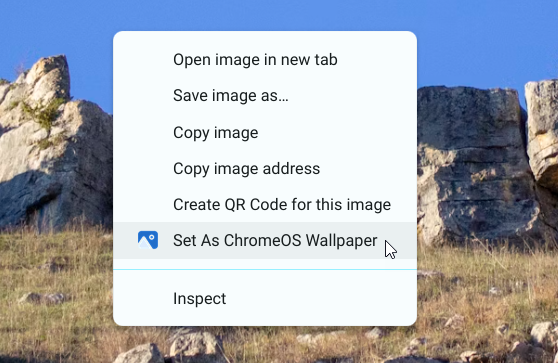
- Right-Click: Right-click on the image. In the context menu that appears, you’ll notice an option for the Set As Chrome OS Wallpaper as shown in the above screenshot.
- Select the Option: Click on the above option, and your selected image will instantly be set as your desktop wallpaper.
There’s no need to save the image to your downloads or open any additional settings. The extension does everything for you in one smooth action.
For users who love changing their desktop look regularly, this extension is a perfect tool to streamline that customization. If you’re a Chromebook user who enjoys refreshing your desktop look with new wallpapers regularly, the Set Images As Chrome OS Wallpaper extension is a must-have.
If you find this extension helpful, please consider giving it a 5-star rating on the Chrome Web Store. For any feedback or suggestion, leave a comment below.
Also Try: Bing Background Images As Chromebook Wallpaper
Icon credit: Extension Icon by Arkinasi on Freepik.