In the modern digital era, emojis (emoticons or emoji symbols) have become an integral part of online communication, adding a fun and expressive element to our messages. They help convey emotions, intent, and personality in a way that text sometimes falls short. To make the process of using emojis more efficient in desktop browsers, we offer a very handy extension: Emoji Copy and Paste.
This extension is available for Google Chrome, Microsoft Edge, Mozilla Firefox and other supported browsers. It provides easy access to a vast library of emojis. It eliminates the need to navigate away from your current page to find and copy the emoji you want to use, or using any complex emoji keyboard utility.
Why?
Using emojis on mobile phones is convenient, but typing them on desktop computers can be more challenging. Unlike mobile keyboards such as Gboard where a simple tap on the emoji button reveals a whole universe of emojis, desktops don’t always have such straightforward access.
However, there are solutions. On a Mac, pressing control + command + space opens an emoji picker. On Windows, Windows key + . or Windows key + ; does the same. Some browsers and web applications also feature built-in emoji pickers for easier access. To make the process simpler and more uniform, we have created this Emoji Copy and Paste extension.
How To Use?
First of all, install the “Emoji Copy and Paste” extension in your browser. It is available on Chrome Web Store, Microsoft Edge’s Add-on Store, and Mozilla’s Add-ons Store.
Once installed successfully, you need to place its icon on the browser toolbar. Follow this tutorial for detailed instructions for this step.
Now, simply click the extension’s icon, which would show a popup window with all the supported emojis as shown in the following screenshot. You can also use keyboard command Alt + Shift + E to open this popup.
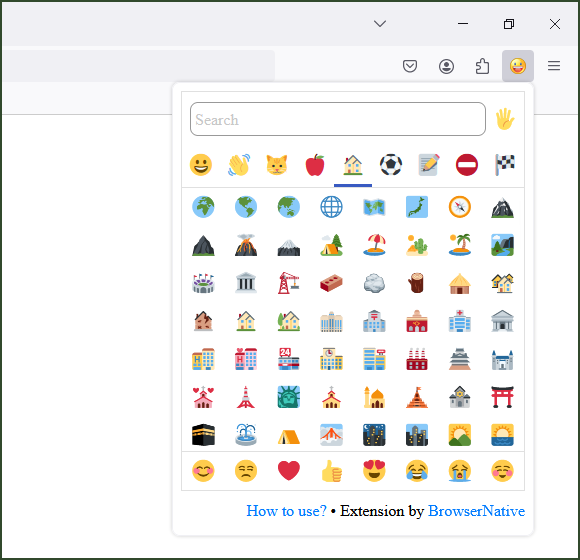
This popup window provides a complete list of supported emojis. You can scroll through or use the search feature to quickly find your favorites. Click on any emoji, and it would be automatically copied to your clipboard. Then, you can paste it anywhere (including other applications) just by using the usual Ctrl/CMD + V keyboard shortcut, or the “Paste” option in the context menu (right-click menu).
Emoji Support
The exact appearance of emojis depends upon your operating system, browser version and the websites where you use them. So, some emojis may not be supported on your browser, device or platform. For example, most country flag emojis are not supported on Chrome and other Chromium based browsers on Windows.
Credit
The earlier versions of this extension had limited support for emojis, but the latest version supports a wide range of emojis along with search and other features. It is now using the brilliant emoji-picker-element project by Nolan Lawson. The emoji-picker-element is a lightweight web component utility with several customization options.
If you have any feedback or suggestion, please leave a comment below. If you find this extension useful, please rate and review it on the extension stores.