Ask Grok is a browser extension designed to use Grok.com smarter, faster, and more intuitive. It allows you to query selected text or input search terms directly from the address bar, putting the power of Grok just a click away.
Grok AI
Grok is an AI chatbot developed by xAI, a company founded by Elon Musk. Launched in November 2023, it integrates with X.com (formerly Twitter) to provide users with real-time information, answer questions, and generate images. Grok is recognized for its humorous and engaging conversational style.
Although Grok AI is integrated with X.com’s website and apps, it is now also available as a standalone website and iOS app. Grok has emerged as a serious competitor to OpenAI’s ChatGPT, Google Gemini, and Claude. Its standout feature is its exclusive access to real-time Twitter data, giving it a unique edge and making it more relevant than its competitors.
Use Grok AI
Grok is now publicly accessible, allowing users to interact with this xAI chatbot directly on Twitter, as well as through its dedicated app and website. It also has option to attach your files (like PDF, images, documents) and search the web, similar to ChatGPT.
Grok Chrome Extension
We’ve developed a lightweight browser extension for users of the Grok.com website. You can install it directly from this Chrome Web Store page to get started. Once installed, the extension offers two convenient ways to use it:
Use from the address bar: Type @grok in Chrome’s address bar, press Space, enter your query, and hit Enter. This will take you to the Grok website, where your query will be automatically submitted.
Use from the context menu: Highlight the desired text, right-click on it, and choose extension’s option in the appeared context menu as shown in the following screenshot.
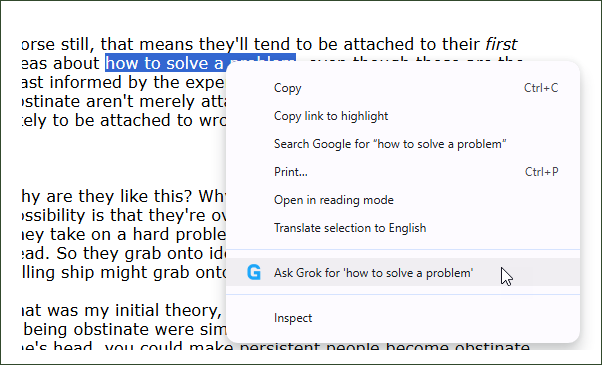
This extension enhances your workflow by seamlessly integrating access to information and insights. Designed to boost productivity with Grok, it’s a must have browser extension for students, developers, professionals, and casual learners alike.
If you find it helpful, we’d appreciate your rating and review on the Chrome Web Store. For any feedback or suggestion, leave a comment below.
I'd like it to just automatically enter the query when typing in address bar and hitting enter after without having to type @grok first. Can you help me with that or make that an option i can configure?