“Incognito This Tab” is a light-weight browser extension for Google Chrome, Microsoft Edge and other supported browsers. It enables users to easily load the current tab in an incognito window. This extension is extremely light-weight and doesn’t require any critical permission like access to your browser history etc.
How to use?
Install this extension from Chrome Web Store and Microsoft’s Edge Add-on Store. We also offer a Firefox port of this extension, read more about it here.
Once installed successfully, you need to pin its icon on the browser toolbar. Pin the extension icon by following this article.
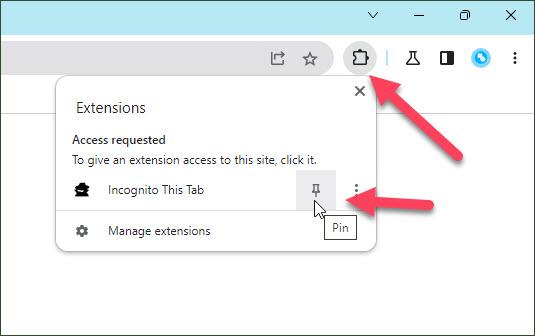
Now, click on this icon whenever you need to use the extension. Clicking this icon loads the current tab in a new incognito window immediately.
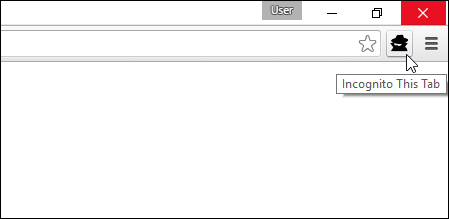
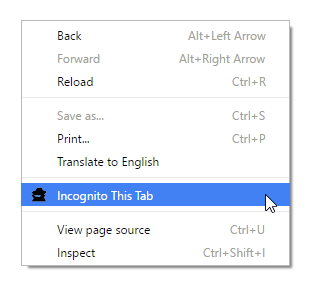
Moreover, you can also use extension’s handy keyboard shortcut, Alt + O, and the context menu option for the same task.
Reverse Functionality
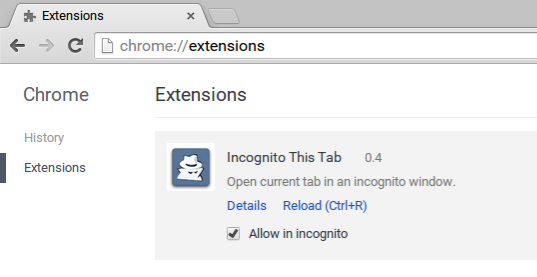
If you want the optional reverse functionality; i.e.; open an incognito tab in a normal window, you need to allow this extension in incognito mode. For this, visit the Extensions page (chrome://extensions) and check the “Allow in incognito” box as shown in the following screenshot:
If you like the extension, please rate it 5-stars on Google Web Store. Have any feedback or suggestion? Leave a comment below, or email us at browsernative.apps@gmail.com.
Update: We invite you to test our new extension Go Incognito. It is almost similar to this Incognito This Tab extension, but offers two advanced features requested by many users: Close the current tab after opening it in incognito mode, and remove the URL from the browsing history. Visit this page to install and read more about it.
@Thbaud: We offer another extension with this functionality: Go Incognito - https://chrome.google.com/webstore/detail/go-incognito/oimfnddepdafdfmammggkfmdepfmipai
Could you make it so that it closes the non-incognito tab?
I want the youtube unblocked
@Aditya: follow this guide to change the keyboard shortcut command:
https://browsernative.com/extensions/change-chrome-extensions-keyboard-shortcuts/
how to change the ALT + O keyboard shortcut
i need to unblock youtube on my school computer. does your extension incognito this tab help in that?
A simple button that makes something rather complex - copying the URL of the current page, closing that page, opening a new incognito window then pasting the URL - into a one click experience. I've found it very useful when for whatever stupid reason a video won't play because of other extensions installed. This extension solves that problem nearly every time.