The Incognito Search Plus extension for Google Chrome and other supported web browsers is a tiny tool for incognito search on Google. It enables users to quickly search on Google using the incognito mode of browser. By searching in incognito mode, Google can’t serve you personalized targeted results, and the search queries are not recorded to your associated Google account. Moreover, the search result pages are not logged to your browsing history as well.
How to use?
To begin using this extension, install it from this Chrome Web Store page. Once installed successfully, you can use it in two ways:
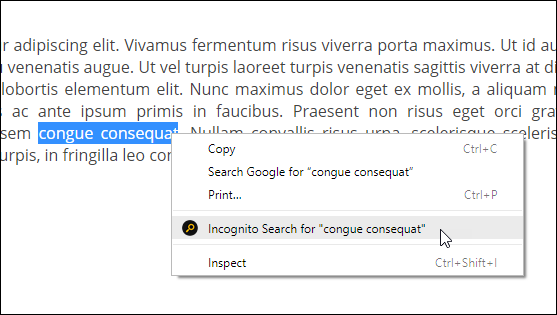
- Select any text and right click on it. Now, use the option “Incognito Search for …” in the appeared menu as shown in the following screenshot:
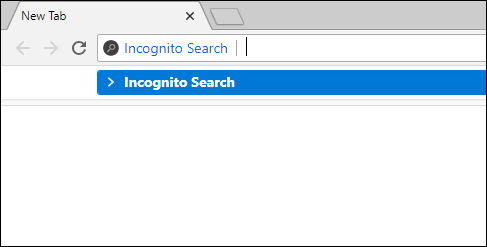
- Type i in the address bar (omnibox) of Chrome and hit the space bar. This will trigger the extension in the address bar. Now, type your search query and press enter key (watch this video for help).
Benefits of Searching in Incognito Mode
This extension loads search result pages in a new incognito window. This ensures that these pages are not logged in your browsing history. Moreover, since the incognito mode is a separate browsing environment, Google cannot associate these search queries with your Google account that is open in the normal browsing windows. Consequently, these items will not appear in your Google Account Search Activity.
This can be especially useful if you’re researching sensitive topics or just don’t want your search history to be cluttered with irrelevant results. Additionally, it can prevent personalized search results from skewing your research, giving you a more accurate picture of what’s out there on the web.
If you like this extension, please rate it 5-stars on Chrome Web Store. Have any feedback or suggestion? Leave a comment below, or email us at apps@browsernative.com.
Suggested Extension: Go Incognito
works fine with google, please add more search engines
Very helpful tool for google incognito search!