The “Image Downloader” is a helpful Chrome extension to download images from Instagram posts. Let’s see how to install and use it.
To begin, first install this extension from Chrome Web Store in your browser. It supports Google Chrome and other Chromium-based browsers like Microsoft Edge, Vivaldi, Brave etc.
Once installed successfully, open any Instagram page in a new tab of the browser (or refresh any previously open tab). Now, to download any image from Instagram, simply right click on it and select the option Save as shown in the following screenshot:
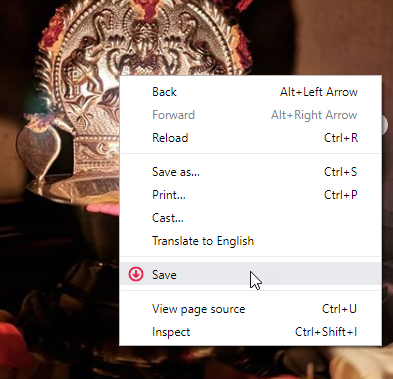
This extension works for multiple images posted in a single Instagram post.
This Instagram downloader extension doesn’t depend upon any third-party service, and connects directly to the Instagram. You can download Instagram images right from the Instagram.com within few seconds.
It is a lightweight, privacy-friendly and to-the-point extension, which doesn’t track users in any possible way.
The latest version of this extension has been forked from InstaSee by Chris Panayotoff. If you like this extension, please rate it 5⭐ on the Chrome Web Store. Facing any problem or have any feedback? Leave a comment below, or email us at browsernative.apps[@]gmail.com.
Check our other browser extensions for Google Chrome, Microsoft Edge and Mozilla Firefox.
I wish to download multiple items from a single post. I can go from one to the next (PIC) right clicking and saving. But..., If there are videos in the post, Right clicking does nothing. So if I right click on the three dots (In single video posts, this works for me), it keeps coming up with the address to the first file in the post. Or it comes up with some file that has no extension, which I cannot download because of "Filed - Network Error" errors. Can you tell me if I'm doing something wrong? Or if this can be remedied, avoided, or averted?
Thanks for making this program!
works only for images, fails for downloading videos. Please correct this. I'm first playing the video and only then trying to download as told in this article.
Thanks for creating this wonderful extension. No need to use any website.
Please add an option to save the instagram captions along with the images and videos. Caption text could be saved automatically when downloading any image.
It can't download all instagram photos at once, but it works for individual photos and videos. Could you update your chrome extension to download all instagram photos at once?
Hi. your extension works fine to download instagram videos and images, but it doesn't download instagram tv IGTV videos. Can you please add support for downloading instagram tv IGTV videos downloading?
thanks again for this good instagram downloader!
@Katy and Lucio: We are looking into this.
The new version is not working for me. I do not see a "save" option when I right-click on an Instagram photo, and when I try the old red extension icon, it just takes me to the page talking about the new version. I only have the old "save as" option that attempts to download the html page. I have brought my pc up to date and rebooted several times (I'm on Windows 10). My Google Chrome is up to date. What else can I try?