Our User-Agent Switcher is a new browser extension for Google Chrome and other supported browsers. It is the Manifest Version 3 port of our popular User-Agent Switcher (MV2) extension with several improvements and new features.
How to Use?
Begin by installing the extension from this Chrome Web Store page. Once installed, pin the extension to your browser toolbar to ensure quick and easy access. Follow this tutorial to learn about pinning the extension on the toolbar.
Now, whenever you want to change the User-Agent string of your browser, simply click the extension icon. This should open a popup window as shown in the following screenshot:
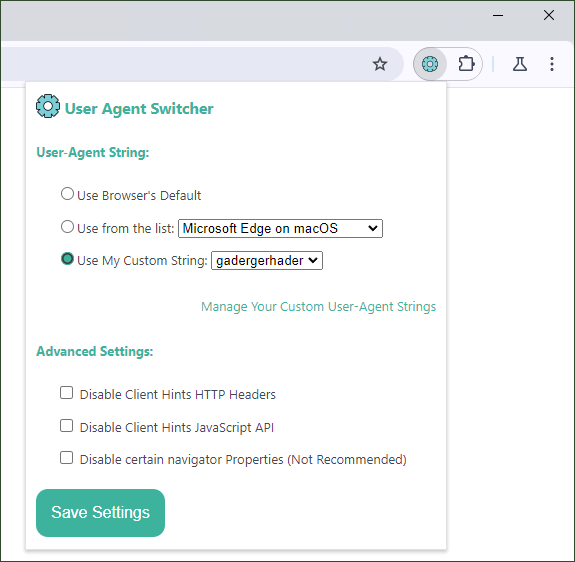
Here you can select your desired User-Agent string. By default, this extension does not alter your browser’s default User-Agent. You can choose a new User-Agent string from a list of presets or input your own custom string. Additionally, you have the option to save multiple custom User-Agent strings for easy access.
Available Presets
- Firefox on Windows 10
- Chrome on Android
- Safari on iPhone
- Safari on macOS
- Chrome on iPad
- Chrome on ChromeOS
- Microsoft Edge on macOS
- Chromium on Raspberry Pi 4
- Internet Explorer 6
- Chrome on Fuchsia OS
- Amazon Kindle’s Browser
- Googlebot (smartphone and classic)
- OpenAI’s GPTBot
- Chrome Headless (Puppeteer)
- cURL
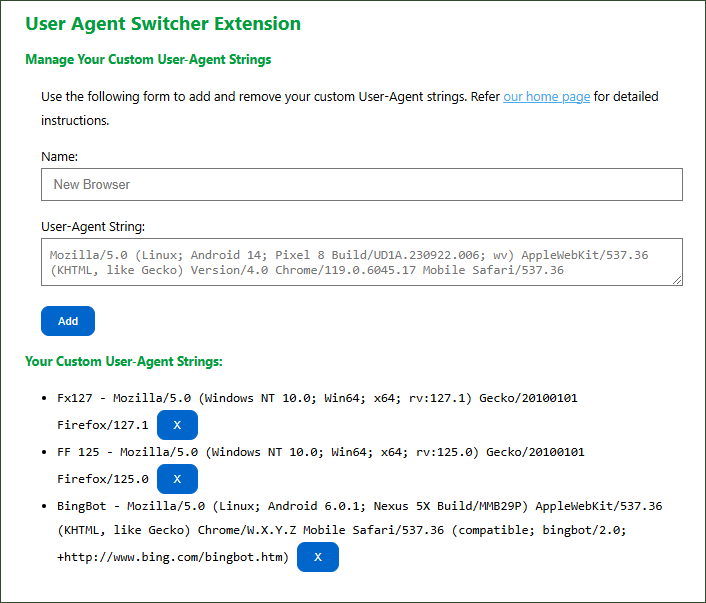
Add your own User-Strings
As mentioned above, users can save and use multiple custom User-Agent strings with this extension. This allows for quick switching between different User-Agent profiles, making it easier to test how websites behave across various devices and browsers without needing to manually re-enter strings each time. This feature is especially useful for developers and testers who need to test their project for multiple User-Agent strings.
Disable Client Hints
Browser detection has evolved beyond relying solely on the User-Agent string, incorporating more robust methods like Client Hints HTTP headers and the Client Hints JavaScript APIs. Since the User-Agent string can be easily spoofed, these modern methods enable websites to detect browsers more reliably, without relying on User-Agent string parsing.
Client Hints allow servers to request specific browser and device information through the HTTP Headers such as Sec-CH-UA, Sec-CH-UA-Platform, and Sec-CH-UA-Mobile, providing more precise details about the user’s environment without the need for extensive User-Agent parsing.
Additionally, the Client Hints JS API enables dynamic requests for this information on the client side, enhancing responsiveness to different device capabilities.
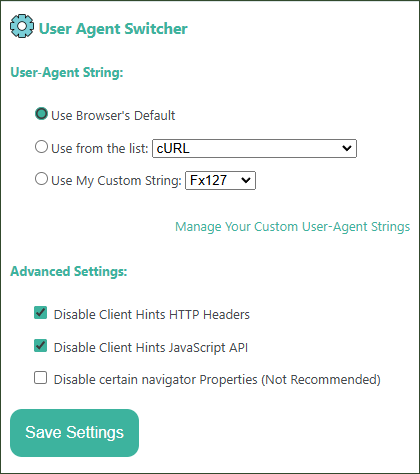
Our “User-Agent Switcher” extension offers optional settings to completely disable the Client Hints HTTP headers and the Client Hints JavaScript APIs. When you opt to disable these two features of your browser, the Client Hints HTTP headers are not sent with your web requests, and Client-Hint JS APIs return undefined on the client side. Hence, websites can’t detect your actual browser using these two options, and generally fallback to legacy User-Agent String detection method.
navigator.userAgent
navigator.userAgent is a property of the navigator object in JavaScript that returns a string representing the user’s browser and operating system. This string typically includes information such as the browser name, version, operating system, and other details about the user’s device and environment. Websites can utilize the navigator.userAgent property as part of browser fingerprinting techniques to track users. This extension offers an optional setting to disable navigator.userAgent property as well.
Important Note
We don’t recommend disabling navigator.userAgent property as this may break functionality of some sites.
Moreover, disabling Client Hints and the navigator.userAgent property can inadvertently signal to some websites that your activity is automated, potentially leading them to classify you as a bot. This is because many websites rely on these identifiers to assess the legitimacy of user interactions. When such information is absent or altered, it may trigger anti-bot mechanisms designed to detect and block automated access. Therefore, exercise caution when adjusting these settings.
Test Your Settings
You can use following tools to test working of this extension:
- To test your current User-Agent String setting, you can simply search “my user agent string” on Google, and it shows result directly on the search result page itself, without visiting any other link.
- For Client Hints HTTP headers and JS APIs, use this excellent utility by BrowserLeaks. This utility also shows your current User-Agent string.
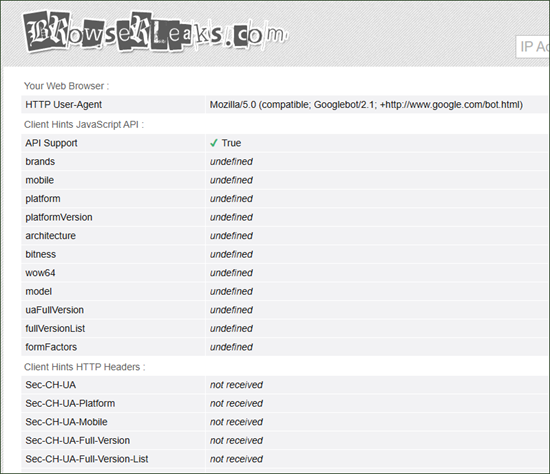
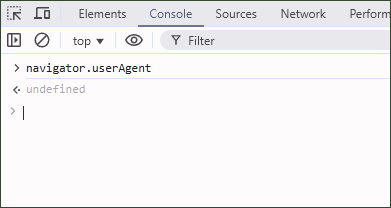
- For
navigator.userAgentproperty, easiest way is use browser’s dev tools. Open JavaScript console, and enternavigator.userAgent, which should outputundefinedif you have opted to disable it.
Support
We hope you find this extension helpful! We’d love to hear your thoughts and suggestions, feel free to leave a comment below or reach out via email at browsernative.apps@gmail.com.
If you like this extension, please rate it 5-stars on its Chrome Web Store listing page.
I love the extension, I use it for testing, but sometimes I just forget it's enabled, and I realize it after too long.
Can you PLEASE change color of the icon, or add some visual hints to it when it's using something different than the browser's default?